IPTV Parental Dashboard: Monitor What Your Kids Watch Live
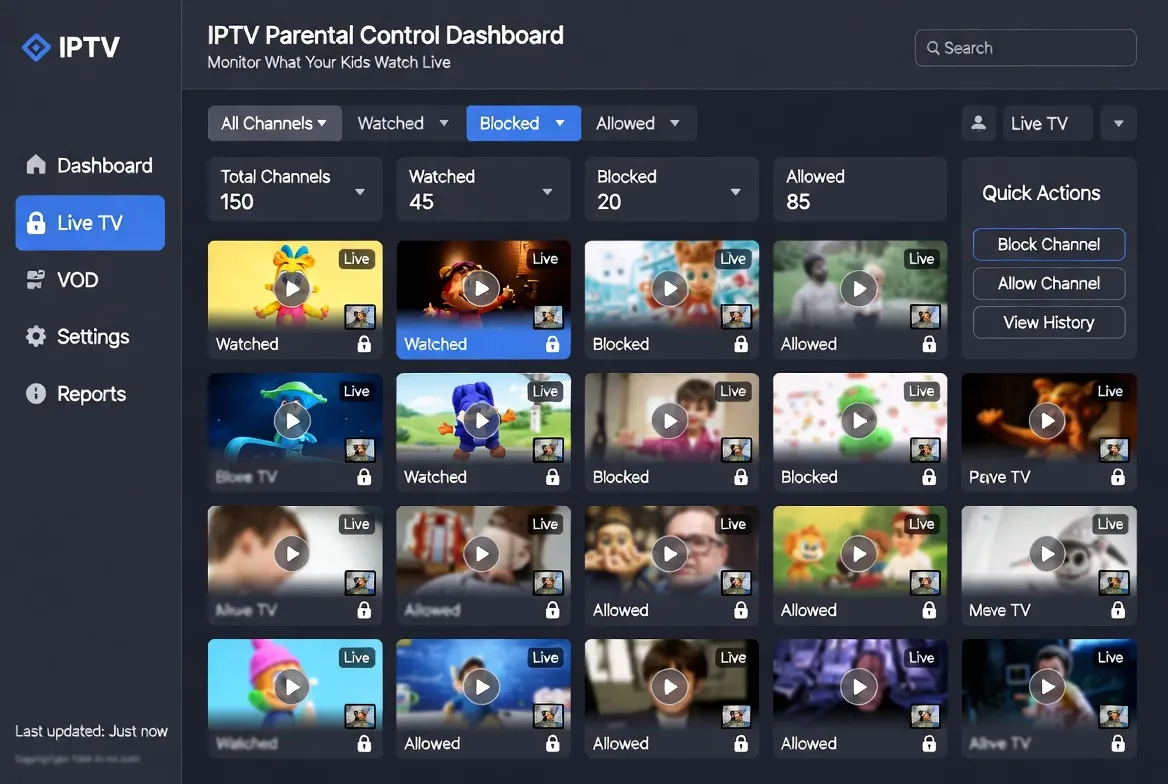
No more guessing what your kids watch when you're not in the room. StreamTV at $11.88/month includes a built-in parental dashboard — live monitoring, PIN-locked categories, time limits and weekly screen-time reports per child. Everything parents need, nothing extra to install.
Live Activity Monitoring
See what every family member is watching right now — channel, runtime, device, history
PIN-Lock Adult Channels
Block adult, news, R-rated movie categories with parent-only PIN. Kids can't unlock
Daily Time Limits
Set 1-hour weekday / 3-hour weekend limits per child profile — auto-cuts at limit
Weekly Watch Reports
Email summary every Sunday — top channels, total hours, screen-time trends per kid
6 Parental Controls Built-In
Profile-Based Filtering
Create separate profiles per child — Kid (5-10), Tween (11-13), Teen (14+) — each sees only age-appropriate channels
Channel Whitelist Mode
Strict mode — kids see ONLY pre-approved channels (PBS Kids, Disney, Cartoon Network). Everything else hidden
Bedtime Auto-Off
Schedule TV to auto-power-off at 9pm school nights, 10pm weekends — no more midnight YouTube binges
Movie Rating Filter
Block VOD movies above G/PG/PG-13/R rating — kids never see Mature content even when browsing alone
Search History Logs
Audit what kids searched for + watched — spot concerning patterns early, have informed conversations
Remote Lock from Phone
Lock the TV instantly from your phone if kid breaks rules — works even when you're at work
4-Step Family Setup
Subscribe to StreamTV ($11.88/mo)
Free 24-hour trial. Includes parental dashboard at no extra cost — comes built into the app
Create Family Profiles
Open IPTV Smarters → Settings → Family → Add child profile with age + custom rules
Set Master PIN
Choose 4-digit PIN only parents know. Required to unlock adult content, change limits or watch past bedtime
Enable Activity Reports
Toggle weekly email reports on. Get Sunday digest of every channel, every hour, every device per child
Real Parenting Scenarios Solved
Co-Parenting Across Two Homes
Both parents see same dashboard from anywhere — consistent screen-time rules whether kid is at mom's or dad's
Teen Sneaking Late-Night TV
Bedtime auto-off + activity logs = kid can't watch unauthorized content after lights-out without you knowing
Young Kids on Their Own TV
Whitelist-only profile — child can browse channels safely while you cook or shower, no risk of accidental adult content
Visiting Grandparents
Set 'guest profile' for short visits — same kid-safe rules apply at grandma's house when she babysits
Frequently Asked Questions
Best IPTV with parental controls in 2026?
The best IPTV with parental controls in 2026 is StreamTV at $11.88/month — includes live activity monitoring, PIN-locked categories, daily time limits, profile-based filtering and weekly email reports per child. All built-in, no extra cost or third-party apps.
Can I monitor what my kids watch on IPTV in real time?
Yes — StreamTV's parental dashboard shows live activity per device and per family profile. See what your child is watching right now, for how long, on which TV. Lock or pause remotely from your phone instantly.
How do I block adult channels on IPTV?
Open IPTV Smarters → Settings → Parental Control → set 4-digit PIN → check categories to block (Adult, News, Mature movies). Categories disappear from kids' profiles entirely. Only PIN unlocks them temporarily.
Can I set screen-time limits for kids on IPTV?
Yes — StreamTV's parental dashboard supports per-child daily time limits. Set 1 hour weekday / 3 hours weekend (or any custom amount). TV auto-turns off when limit hits, with optional 5-min warning. Resets at midnight.
Does StreamTV send weekly screen-time reports?
Yes — enable weekly email reports in parental settings. Every Sunday you receive a digest per child: top channels watched, total hours, peak viewing times, devices used. Helps spot trends and have informed conversations.
Can divorced parents share parental controls?
Yes — both parents log into the same StreamTV account from any device. Both see the same dashboard, both get weekly reports, both can adjust rules. Perfect for co-parenting consistent screen-time rules across two households.
Peace of Mind Built Into Every Subscription
Live monitoring, PIN locks, time limits. $11.88/mo. Free 24-hour trial.