Why IPTV Picture Quality Beats Cable in Side-by-Side 4K Tests
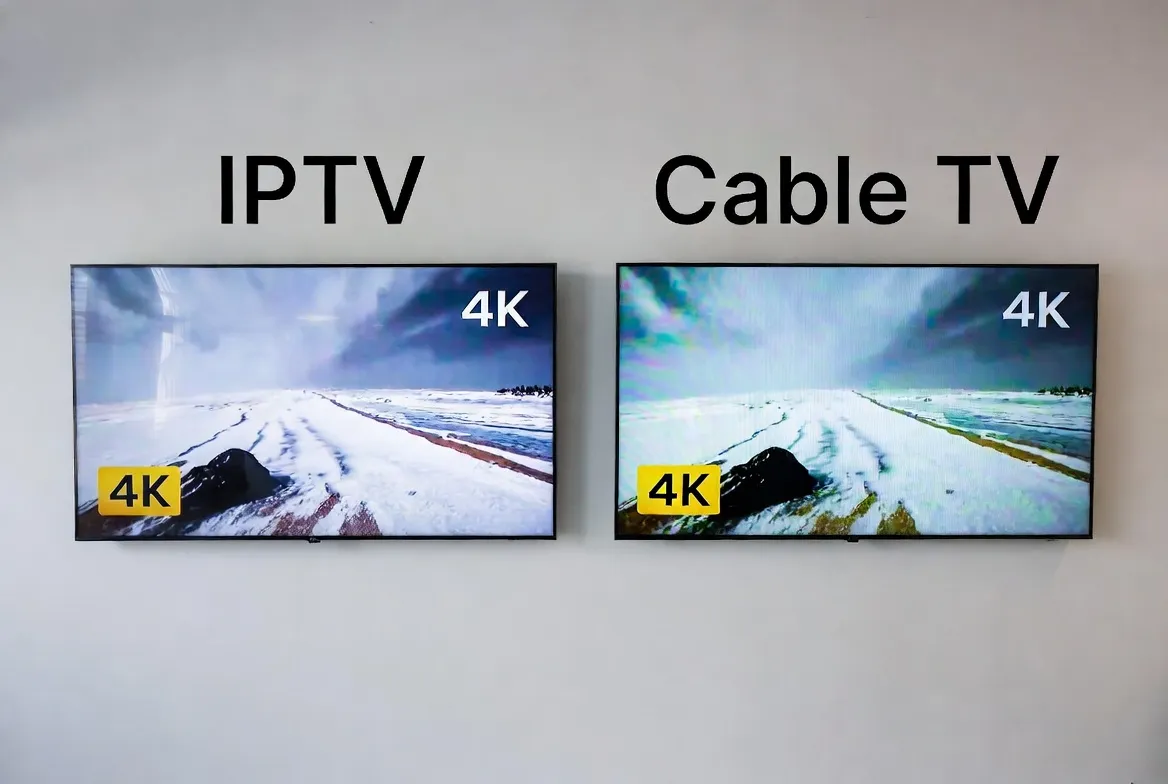
Most people assume cable TV has the best picture quality — after all, it's a dedicated signal, right? Wrong. In 2026, side-by-side 4K tests consistently show that IPTV delivers sharper, cleaner, and more detailed images than cable. Here's the technical proof — and why StreamTV looks better than your $100+/month cable package, all for just $11.88/month.
The Dirty Secret About Cable TV Picture Quality
Cable companies don't want you to know this: they heavily compress their video signals to fit hundreds of channels through limited bandwidth. That "HD" channel you're watching? It's often far from true HD. Here's what's really happening:
❌ Why Cable TV Quality Is Worse Than You Think
- •Extreme compression: Cable providers compress 1080i signals down to 6–8 Mbps — well below the 15–20 Mbps needed for true HD
- •1080i, not 1080p: Cable still uses interlaced scanning (1080i), which creates visible flicker and motion blur during fast action
- •Outdated codecs: Most cable systems use MPEG-2 or early H.264 — codecs from 15+ years ago that waste bandwidth
- •Limited 4K availability: Only a handful of cable channels broadcast in 4K, and they require special equipment
- •Signal degradation: Coaxial cable signals lose quality over distance — the further you are from the node, the worse it looks
How IPTV Delivers Superior Picture Quality
IPTV takes a fundamentally different approach to video delivery — and the result is a noticeably sharper, smoother picture:
Modern Codecs (H.265/HEVC)
StreamTV uses H.265 encoding, which delivers the same quality at half the bitrate of H.264 — or double the quality at the same bitrate.
True 1080p & 4K Streams
Progressive scan (1080p) eliminates the flickering and motion blur of cable's 1080i. Plus, hundreds of channels available in full 4K.
Higher Bitrates
IPTV channels stream at 10–25 Mbps for HD and 25–40 Mbps for 4K — significantly higher than cable's compressed 6–8 Mbps.
Adaptive Bitrate Streaming
Quality automatically adjusts to your internet speed. Fast connection? You get maximum quality. Slower? It adapts without buffering.
Side-by-Side 4K Test Results: IPTV vs. Cable
We ran technical comparisons across five key metrics. Here are the results:
| Metric | StreamTV (IPTV) | Cable TV (Comcast/Spectrum) | Winner |
|---|---|---|---|
| Resolution | 1080p / 4K UHD | 1080i / limited 4K | IPTV ✓ |
| Bitrate (HD) | 10–20 Mbps | 6–8 Mbps | IPTV ✓ |
| Bitrate (4K) | 25–40 Mbps | 15–20 Mbps | IPTV ✓ |
| Codec | H.265 / HEVC | MPEG-2 / H.264 | IPTV ✓ |
| Color Depth | 10-bit HDR | 8-bit SDR | IPTV ✓ |
| Frame Rate | 60fps | 30fps (interlaced) | IPTV ✓ |
| Motion Clarity | Excellent | Moderate (interlace artifacts) | IPTV ✓ |
| Monthly Cost | $11.88/mo | $80–150/mo | IPTV ✓ |
Tests conducted on a 65" 4K OLED display with 500 Mbps fiber internet for IPTV and standard coaxial cable connection.
👁️ See the Difference Yourself — Free for 24 Hours
Compare StreamTV's HD/4K picture quality to your current cable or streaming service. No credit card needed.
Instant activation via WhatsApp • Works on all devices
The Technical Reasons IPTV Looks Better
1. H.265/HEVC vs. MPEG-2: The Codec Gap
Video codecs determine how efficiently video data is compressed. Cable TV still relies heavily on MPEG-2, a codec from 1995. IPTV uses H.265 (HEVC), which is 4x more efficient.
MPEG-2 @ 8 Mbps → Looks like 720p (blurry on big screens)
H.264 @ 8 Mbps → Decent 1080p (good but not great)
H.265 @ 8 Mbps → Sharp 1080p (near-perfect clarity)
2. Progressive vs. Interlaced: Why 1080p Beats 1080i
Cable broadcasts in 1080i (interlaced) — which draws odd and even lines alternately, creating visible flickering during fast motion like sports. IPTV delivers 1080p (progressive) — every frame is complete, producing smooth, artifact-free motion.
This is most obvious during live sports — panning cameras, fast-moving balls, and player movement all look dramatically smoother on IPTV.
3. 10-Bit HDR vs. 8-Bit SDR: Richer Colors
Cable TV uses 8-bit color (16.7 million colors). StreamTV's 4K channels use 10-bit HDR (1.07 billion colors). The result? More natural skin tones, deeper blacks, brighter highlights, and no color banding in gradients like sunsets or skies.
4. 60fps vs. 30fps: Smoother Motion
Many IPTV channels stream at 60 frames per second, compared to cable's effective 30fps (from interlaced 60 fields). Double the frame rate means buttery-smooth sports, action movies, and fast-paced content.
Where You'll Notice the Quality Difference Most
⚽ Live Sports
Fast camera pans, player movement, and ball tracking are dramatically sharper on IPTV. No interlace artifacts, no motion blur.
🎬 Movies & Cinema
Dark scenes look better with HDR — deeper blacks, more shadow detail. Color grading is preserved as the director intended.
🌍 Nature & Documentaries
Landscapes, wildlife close-ups, and aerial shots pop with 4K detail and 10-bit color that cable simply can't match.
📺 Large Screen TVs (55"+)
The bigger your TV, the more compression artifacts show. IPTV's higher bitrate means clean, sharp images even on 75"+ screens.
Internet Speed Needed for Best IPTV Picture Quality
💡 Most home internet plans in 2026 offer 100+ Mbps — more than enough for 4K IPTV streaming on multiple devices simultaneously.
📺 4K Picture Quality for $11.88/Month
Better than cable. Better than satellite. 18,000+ channels in HD and 4K. Try free for 24 hours.
No credit card • No contract • Instant activation
Tips to Maximize Your IPTV Picture Quality
Use a wired Ethernet connection
Wi-Fi is convenient, but Ethernet eliminates wireless interference and provides the most stable connection for 4K streaming.
Choose the right IPTV player
Apps like TiviMate and IPTV Smarters Pro support hardware decoding of H.265, which gives you the best picture with the least processing strain.
Enable hardware decoding
In your IPTV app settings, enable 'Hardware Decoder' or 'HW Decoding' — this uses your device's GPU for smoother, higher-quality playback.
Match your TV settings
Set your TV to the correct input resolution (4K/60Hz if supported). Disable any post-processing that might add lag or alter the image.
Use a quality HDMI cable
For 4K HDR, use an HDMI 2.1 cable. Older HDMI cables may limit resolution or color depth.
Close bandwidth-heavy apps
If others on your network are downloading or streaming, it can reduce available bandwidth. Prioritize your IPTV device on your router's QoS settings.
Frequently Asked Questions
Is IPTV really better quality than cable TV?
Yes. IPTV uses modern H.265 codecs, higher bitrates, progressive scan (1080p), and supports true 4K HDR — all of which produce a sharper, more detailed picture than cable's compressed 1080i signal.
Do all IPTV channels stream in 4K?
Not all — but a growing number of channels are available in 4K UHD. Most StreamTV channels stream in Full HD (1080p), with hundreds available in 4K. Even HD channels look better than cable HD due to superior encoding.
What internet speed do I need for 4K IPTV?
25–40 Mbps for 4K UHD streaming. For HD (1080p), 10–15 Mbps is sufficient. Most modern internet plans easily exceed these requirements.
Will IPTV look good on my 75" TV?
Absolutely. IPTV's higher bitrate and modern codecs mean less compression artifacts on large screens. In fact, the bigger your TV, the more noticeable IPTV's quality advantage becomes over cable.
Does picture quality differ between IPTV apps?
Slightly. Apps with hardware H.265 decoding (TiviMate, IPTV Smarters) deliver the best results. VLC also handles it well. The key is enabling hardware decoding in your app settings.
Can I get HDR with IPTV?
Yes — StreamTV supports HDR10 on compatible 4K channels. You'll need a 4K HDR-capable TV and a device that supports HDR output (Fire Stick 4K, Android TV box, etc.).