IPTV on Amazon Fire Tablet: Setup Guide for Portable Streaming
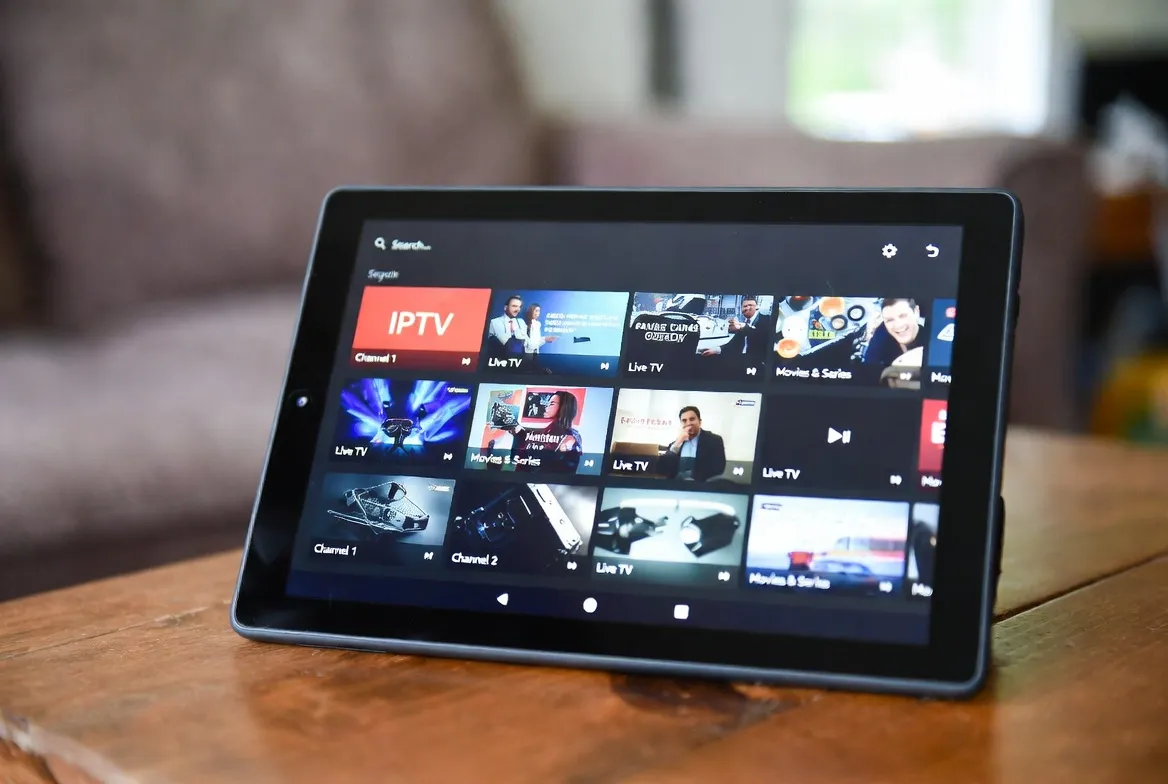
The Amazon Fire Tablet is one of the best-kept secrets for portable IPTV streaming. Starting at just $59.99, it gives you a full HD screen, all-day battery life, and full compatibility with IPTV apps — making it the perfect device to watch 18,000+ live channels from bed, the kitchen, on the go, or anywhere in your home. Here's exactly how to set it up in under 5 minutes.
📱 Turn Your Fire Tablet Into a Portable TV
18,000+ live channels on your Fire Tablet. Set up in 5 minutes, stream anywhere.
Why the Amazon Fire Tablet Is Perfect for IPTV
Incredibly Affordable
Fire HD 8 starts at $99, Fire HD 10 at $149. The cheapest way to get a dedicated IPTV screen.
Great Display Quality
Fire HD 10 has a 10.1" 1080p display — perfect for watching live TV, sports, and movies.
All-Day Battery
Up to 13 hours of battery life. Watch an entire day of football without plugging in.
Easy App Sideloading
Fire OS is Android-based, so you can install any IPTV APK in minutes.
Wi-Fi + Optional LTE
Connect via Wi-Fi at home or use your phone's hotspot for streaming on the go.
Built-In Stand/Case
Amazon's official case doubles as a stand — prop it up in the kitchen, bedroom, or car.
Best Amazon Fire Tablet Models for IPTV
| Model | Price | Screen | RAM | Battery | IPTV Rating |
|---|---|---|---|---|---|
| Fire HD 10 (2023) | $149 | 10.1" 1080p | 3 GB | 13 hrs | ⭐⭐⭐⭐⭐ |
| Fire HD 10 Plus | $189 | 10.1" 1080p | 4 GB | 13 hrs | ⭐⭐⭐⭐⭐ |
| Fire HD 8 (2022) | $99 | 8" 720p | 2 GB | 13 hrs | ⭐⭐⭐⭐ |
| Fire HD 8 Plus | $119 | 8" 720p | 3 GB | 13 hrs | ⭐⭐⭐⭐ |
| Fire 7 (2022) | $59 | 7" 1024x600 | 2 GB | 10 hrs | ⭐⭐⭐ |
| Fire Max 11 | $229 | 11" 2K | 4 GB | 14 hrs | ⭐⭐⭐⭐⭐ |
Our Pick: Fire HD 10 (2023)
Best balance of screen size, performance, and price. The 10.1" 1080p display is ideal for IPTV and the 3GB RAM handles HD streaming without lag. At $149 (often on sale for $99), it's unbeatable value.
How to Set Up IPTV on Fire Tablet (Step-by-Step)
Method 1: Install IPTV Smarters (Easiest)
Open the Amazon Appstore
On your Fire Tablet home screen, tap the Appstore icon.
Search for "IPTV Smarters"
Type 'IPTV Smarters' or 'IPTV Smarters Pro' in the search bar.
Install the App
Tap 'Get' or 'Download' and wait for installation (under 1 minute).
Open & Select Login Type
Choose 'Xtream Codes API' for the best experience.
Enter StreamTV Credentials
Input the server URL, username, and password from your StreamTV account.
Start Watching
Browse Live TV, VOD, or Series categories. Tap any channel to stream instantly.
Method 2: Sideload TiviMate (Advanced)
Enable Apps from Unknown Sources
Go to Settings → Security & Privacy → Apps from Unknown Sources → Silk Browser → Toggle ON.
Download the Downloader App
Search 'Downloader' in the Amazon Appstore and install it (free).
Open Downloader & Enter URL
Type the TiviMate APK download URL in Downloader's URL field.
Install TiviMate
When the download completes, tap 'Install' and then 'Open'.
Add Your IPTV Playlist
Choose 'Xtream Codes' and enter your StreamTV server URL, username, and password.
Enjoy the Full EPG Experience
TiviMate gives you a cable TV-style guide with channel logos, favorites, and catch-up.
Best IPTV Apps for Amazon Fire Tablet
| App | Price | EPG | Best For | Install Method |
|---|---|---|---|---|
| IPTV Smarters Pro | Free | ✅ | Beginners | Appstore |
| TiviMate | Free / $11.88/yr | ✅ Advanced | Power users | Sideload |
| OTT Navigator | Free | ✅ | Customization | Sideload |
| GSE Smart IPTV | Free | ✅ | Simple interface | Appstore |
| VLC Media Player | Free | ❌ | M3U playlists | Appstore |
| Perfect Player | Free | ✅ | Classic TV feel | Sideload |
Where Truckers, Travelers & Families Use Fire Tablet IPTV
🛏️ Bedroom
Prop it on your nightstand with a case stand. Watch late-night shows without disturbing anyone.
🍳 Kitchen
Mount it on a cabinet or use a stand while cooking. Perfect for morning news and cooking shows.
🚗 Road Trips
Keep kids entertained in the backseat with cartoons and movies via phone hotspot.
🚛 Truck Cab
The ideal size for sleeper cabs. 13-hour battery means all-night entertainment after a long haul.
🏋️ Gym / Treadmill
Stream live sports or music channels while working out.
✈️ Travel
Download VOD content on hotel Wi-Fi, or stream live TV from anywhere in the world.
Pro Tips for Fire Tablet IPTV
- Use Show Mode: Enable "Show Mode" on compatible Fire Tablets to turn it into a bedside TV that displays clock and weather when not streaming.
- Get a Bluetooth speaker: The Fire Tablet's built-in speakers are decent but a $30 Bluetooth speaker makes a huge difference for movies and sports.
- Mirror to TV: Use a Fire TV Stick + Second Screen feature or a USB-C to HDMI adapter to cast your tablet to a big screen.
- Optimize battery life: Lower brightness to 50%, close background apps, and use Wi-Fi instead of hotspot when possible.
- Set quality to 720p on smaller tablets: Fire 7 and Fire HD 8 don't benefit from 1080p streaming — save bandwidth with 720p.
- Create a kids profile: Use Fire Tablet's built-in profiles to set up a kid-friendly IPTV experience with only cartoon and family channels.
📺 Your Fire Tablet + StreamTV = Portable TV
18,000+ channels • 54,000+ movies • HD/4K quality • Works anywhere
Set up in 5 minutes. Stream for $11.88/month. No contract, cancel anytime.
Works on all Fire Tablet models • No sideloading required for basic setup
Frequently Asked Questions
Can I use IPTV on an Amazon Fire Tablet?
Yes. Amazon Fire Tablets run Fire OS (based on Android) and support IPTV apps like IPTV Smarters, TiviMate, and OTT Navigator. IPTV Smarters is available directly in the Amazon Appstore — no sideloading needed.
What is the best IPTV app for Fire Tablet?
IPTV Smarters Pro is the easiest to install and use (available on Appstore). TiviMate offers the best EPG and features but requires sideloading. Both work great on all Fire Tablet models.
Which Amazon Fire Tablet is best for IPTV?
The Fire HD 10 (2023) is our top pick — 10.1-inch 1080p display, 3GB RAM, 13-hour battery, and priced at $149 (often on sale for $99). It handles HD IPTV streaming without any lag.
Do I need to sideload apps for IPTV on Fire Tablet?
Not necessarily. IPTV Smarters and GSE Smart IPTV are available directly in the Amazon Appstore. You only need to sideload if you want TiviMate or OTT Navigator, which takes about 5 minutes.
Can I watch IPTV on Fire Tablet without Wi-Fi?
Yes, you can use your phone's mobile hotspot to stream IPTV on your Fire Tablet anywhere. IPTV uses about 1.5-3 GB per hour in HD, so an unlimited data plan is recommended.
Can I cast IPTV from Fire Tablet to my TV?
Yes. Use the Fire Tablet's built-in Second Screen feature with a Fire TV Stick, or connect via a USB-C to HDMI adapter for a wired connection to any TV.
Is there a free trial for IPTV on Fire Tablet?
Yes. StreamTV offers a 24-hour free trial. Install IPTV Smarters on your Fire Tablet, enter the trial credentials, and test all 18,000+ channels before subscribing.