Roku vs Fire Stick vs Android Box: Best IPTV Device Showdown 2026
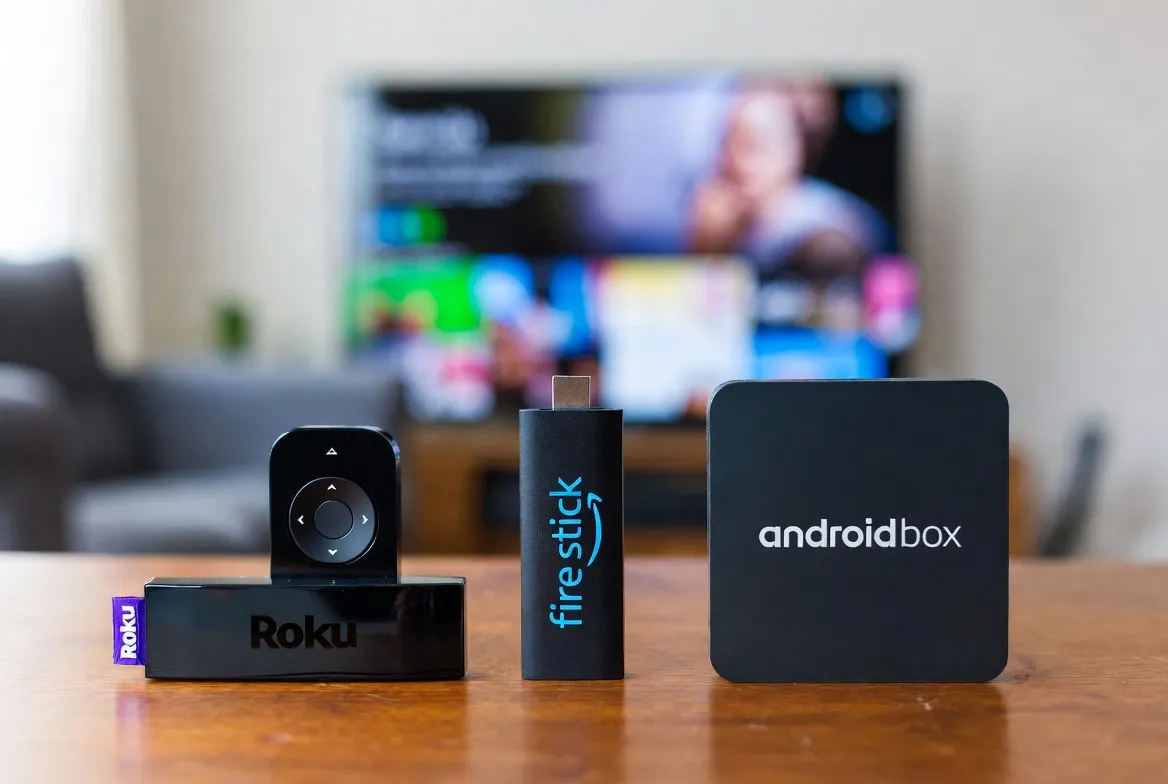
Choosing the right streaming device can make or break your IPTV experience. Roku, Amazon Fire Stick, and Android TV Boxes are the three most popular options — but they're not created equal when it comes to IPTV. Here's the definitive 2026 comparison to help you pick the perfect device.
Quick Verdict: Which Device Wins?
Amazon Fire Stick 4K Max
Best Overall for IPTV
- Easiest IPTV app installation
- Alexa voice control
- 4K HDR + Dolby Vision
- Best price-to-performance
Android TV Box
Best for Power Users
- Most app flexibility
- Sideload anything
- Ethernet + expandable storage
- Best for multi-stream setups
Roku
Most Limited for IPTV
- Clean interface
- Great for mainstream apps
- Limited IPTV app support
- No sideloading allowed
Head-to-Head Spec Comparison
| Feature | Fire Stick 4K Max ✓ | Android TV Box | Roku Streaming Stick+ |
|---|---|---|---|
| Price | $34.99 | $29–$69 | $11.88 |
| 4K HDR Support | ✅ Dolby Vision | ✅ Most models | ✅ HDR10 |
| IPTV App Support | ✅ Excellent | ✅ Best | ⚠️ Very Limited |
| Sideload Apps | ✅ Yes | ✅ Yes (easiest) | ❌ No |
| Voice Control | ✅ Alexa | ✅ Google Assistant | ✅ Roku Voice |
| Ethernet Port | ❌ Adapter needed | ✅ Built-in | ❌ Adapter needed |
| Storage | 16 GB | 32–128 GB | 4 GB |
| RAM | 2 GB | 2–4 GB | 1 GB |
| Wi-Fi 6 Support | ✅ Wi-Fi 6E | ✅ Select models | ❌ Wi-Fi 5 |
| USB Port | ❌ No | ✅ USB 2.0/3.0 | ❌ No |
| Form Factor | Compact stick | Small box | Compact stick |
| Best For | Most IPTV users | Power users | Mainstream streaming |
Got Your Device? Now Get the Content
18,000+ channels and 150,000+ movies work on Fire Stick, Android Box, and more — starting at $11.88/month.
Amazon Fire Stick 4K Max — Best Overall for IPTV
The Fire Stick 4K Max is the go-to device for 80% of IPTV users. Here's why it dominates:
One-Click IPTV Installation
Search 'IPTV Smarters' or 'TiviMate' directly in the Amazon App Store. Install in seconds — no sideloading needed for popular apps.
Alexa Voice Search
Say 'Alexa, open IPTV' or search for channels by name. The fastest way to navigate 18,000+ channels.
Wi-Fi 6E for Zero Buffering
The latest tri-band Wi-Fi 6E delivers faster speeds and lower latency than any competing stick. Perfect for 4K live sports.
Dolby Vision + Atmos
Premium picture quality with Dolby Vision HDR and Dolby Atmos surround sound. Your IPTV streams look cinema-quality.
Our recommendation: The Fire Stick 4K Max at $34.99 offers the best balance of price, performance, and IPTV compatibility. It's the device we recommend to 80% of our subscribers.
Android TV Box — Best for Power Users
If you want maximum flexibility and performance, an Android TV box is the way to go:
Install Any IPTV App
No restrictions. Sideload any APK from any source. TiviMate, XCIPTV, OTT Navigator, Perfect Player — install them all.
Built-in Ethernet Port
Hardwired connection eliminates Wi-Fi interference. Critical for households streaming 4K on multiple devices.
Expandable Storage
32–128 GB internal + microSD slot + USB drives. Store EPG data, catch-up recordings, and app data without space issues.
More Processing Power
Quad-core processors with 2–4 GB RAM handle multi-stream viewing, PIP (picture-in-picture), and fast channel switching.
Top Android TV Boxes for IPTV in 2026
| Model | Price | RAM | Storage | Best For |
|---|---|---|---|---|
| NVIDIA Shield TV Pro | $199 | 3 GB | 16 GB | Premium quality |
| Chromecast with Google TV | $49 | 2 GB | 8 GB | Budget + Google |
| Formuler Z11 Pro Max | $159 | 4 GB | 32 GB | Dedicated IPTV |
| Mecool KM2 Plus | $69 | 2 GB | 16 GB | Value pick |
| BuzzTV XRS 4500 | $139 | 4 GB | 32 GB | IPTV enthusiasts |
Roku — Why It's Not Ideal for IPTV
Roku makes excellent streaming devices for Netflix, Disney+, and Hulu — but it has significant limitations for IPTV:
No sideloading allowed
Roku's closed ecosystem means you can only install apps from their official channel store — and most IPTV apps aren't available there.
Limited IPTV apps in the store
IPTV Smarters, TiviMate, and other popular IPTV players are NOT available on Roku. You're limited to basic M3U players.
Low storage & RAM
Most Roku devices have just 1 GB RAM and 4 GB storage — not enough for smooth IPTV with EPG data and channel lists.
No Ethernet on most models
Only the Roku Ultra ($99) has an Ethernet port. All sticks rely on Wi-Fi, which can cause buffering during peak hours.
Roku actively removes IPTV apps
Roku has been known to pull IPTV-related apps from their store, leaving users without their preferred player.
Already own a Roku? You can still use IPTV via screen mirroring from your phone or laptop. But for the best experience, we recommend picking up a $35 Fire Stick 4K Max.
Pair Your Device with 18,000+ Channels
Fire Stick, Android Box, Smart TV, phone — IPTV works on all of them for just $11.88/month.
Which Device Should You Buy? Our Recommendations
🏆 Most People
Amazon Fire Stick 4K Max — $34.99
Best combination of price, IPTV app support, 4K quality, and ease of use. The device we recommend to most subscribers.
⚡ Power Users & Multi-Screen Setups
NVIDIA Shield TV Pro — $199
Best performance, best upscaling, best for running multiple streams or using advanced IPTV features like PVR recording.
💰 Budget Pick
Chromecast with Google TV — $29
Affordable entry point with Google Assistant and good IPTV app support. Great for bedroom TVs or secondary screens.
🎯 Dedicated IPTV Box
Formuler Z11 Pro Max — $159
Purpose-built for IPTV with MyTVOnline 3 pre-installed. Best EPG, fastest channel zapping, designed specifically for IPTV viewing.
🌐 Wired Connection Priority
Any Android TV Box with Ethernet — $49+
If Wi-Fi isn't reliable in your area, any Android box with a built-in Ethernet port eliminates buffering completely.
The Best Device Means Nothing Without the Best Content
Whether you choose Fire Stick, Android Box, or Smart TV — pair it with 18,000+ live channels and 150,000+ movies for just $11.88/month. Setup takes under 5 minutes on any device.
Works on Fire Stick, Android, Samsung, LG, Apple TV, Roku (via mirroring), phones, tablets, and laptops.